
BCV Converter: A Dollar to Bolívar Web App with the Official BCV Rate
Project Gallery
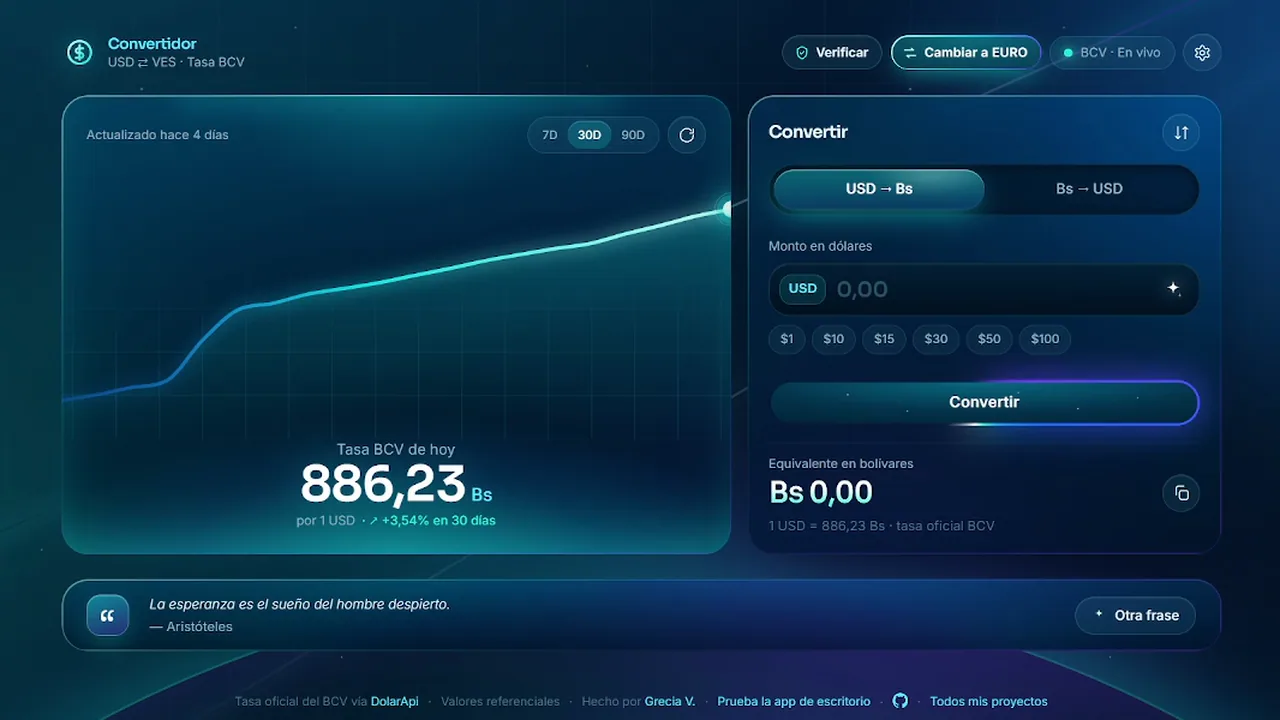
In Venezuela, checking the BCV rate is part of the morning routine. Before you pay for groceries, quote a client or send money to your family, you need to know what one dollar (or one euro) is worth in bolívars today, according to the official rate of the Banco Central de Venezuela.
Most of the places that tell you are either slow, buried in ads, or look like they were designed in 2009. I already had a desktop version in Python, but a desktop app has to be installed, and nobody installs anything to do a two second calculation on their phone.
So I designed the web version: a dollar and euro to bolívar converter that opens in a browser tab, shows today’s BCV rate before anything else and converts while you type.
The design problem
A currency converter has one job, and people use it in a hurry. That set the priorities for the whole interface:
- The rate first. Today’s BCV rate is the biggest thing on the screen, with how much it moved in the last 30 days right under it. Most visits end there.
- Converting second. The calculator sits next to the rate, with quick buttons for 1, 10, 15, 30, 50 and 100, the amounts people actually check, in dollars or euros.
- Everything else is optional. The chart, the settings and the extra buttons are there for whoever wants them, without getting in the way of whoever doesn’t.
Interface decisions
Live conversion. The result updates on every keystroke, in both directions: USD or EUR to Bs, and Bs back. There is a Convert button for people who expect one, but you never need to press it.
Dollar or euro, one tap. The BCV publishes both rates, and plenty of people get paid or quote in euros. A button in the header switches the whole app between dollar and euro: the big rate, the calculator, the quick amounts and the chart. No second page, no dropdown.
A rate history chart. The rate in bolívars changes almost every day, so the number alone doesn’t say much. The 7, 30 and 90 day chart shows the trend at a glance, and the percentage change puts it in plain words.
Liquid glass, in three skins. Translucent panels with soft glow over a dark gradient, in three skins: Fluido (blue), Holograma (iridescent) and Esmeralda (green). You can pick one, rotate them automatically or get a random one each time you open the page. It’s a utility, but there’s no reason a utility has to look sad.
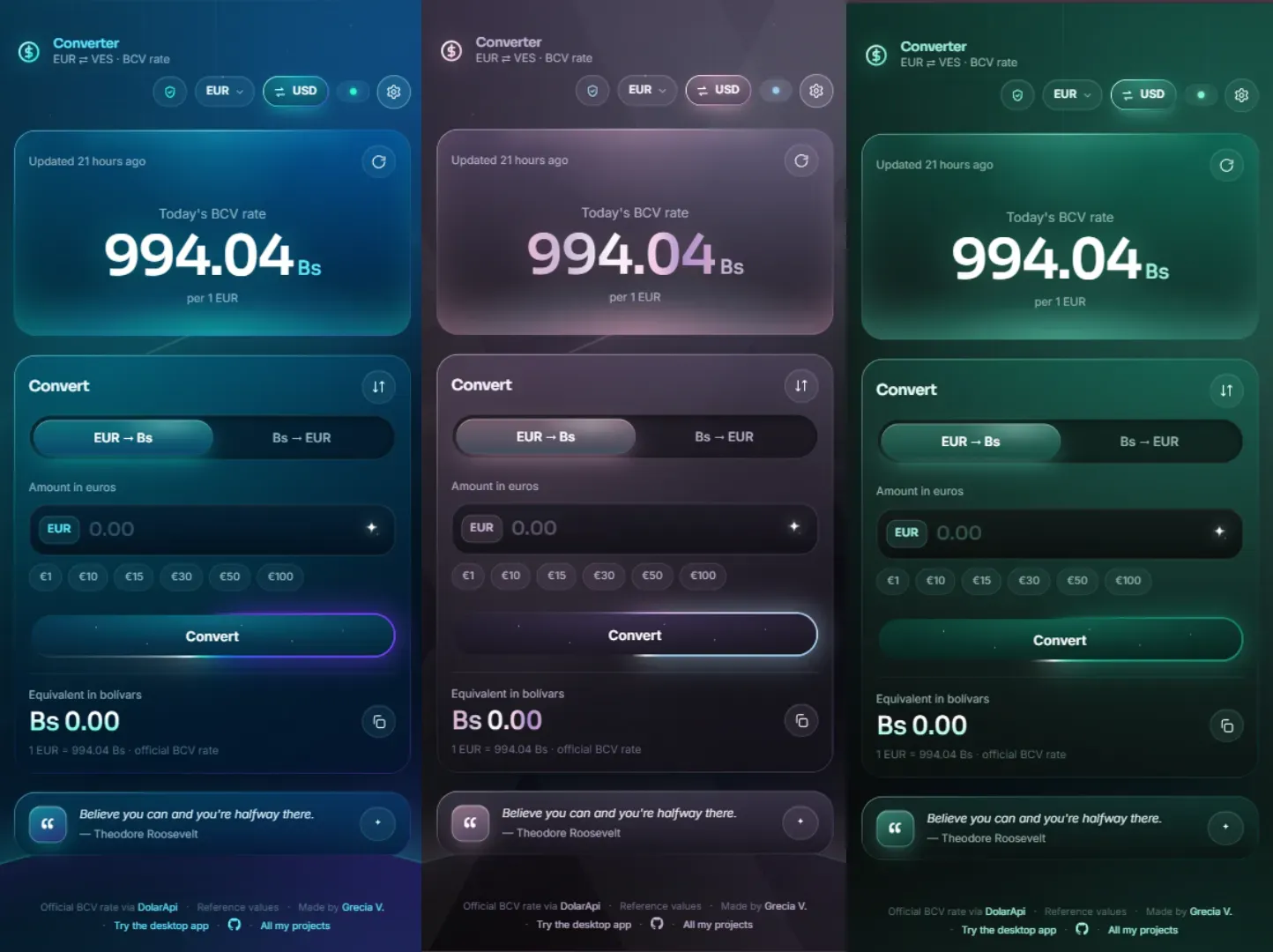
A price only view. For people who just want the number, a toggle hides the chart and the percentage and leaves the rate on its own.
Trust built into the UI. An optional Verify button links straight to the official BCV page, so anyone can compare the number. With money involved, being able to check matters more than looking polished.
A small human touch. Every visit shows a different quote about hope and motivation, 38 of them, in Spanish and English. It’s not a feature anyone asked for. It’s there because people check the exchange rate on bad days too.
How it works
The app uses no frameworks and needs no build step: HTML, CSS and vanilla JavaScript, with Tailwind CSS for the layout.
The first version got the rate from a third party API, and that was the weak spot: when the BCV published the new rate in the afternoon, the API sometimes took hours to catch up. So now the rate comes from the source:
- Every 30 minutes, a GitHub Action runs a small Node script that reads the dollar and euro rates, with their value date, straight from bcv.org.ve.
- If the rate changed, it saves it to a
rates.jsonfile and commits it, and Netlify publishes the update on its own. - The site reads that file and DolarApi at the same time and shows whichever is most recent, so the new rate shows up as soon as the BCV publishes it.
- The script rejects any rate that jumps more than 25% from the last one. A typo on the BCV website shouldn’t become the rate on your phone.
- The 7, 30 and 90 day history comes from DolarApi Venezuela.
- If there is no connection, it shows the last rate it loaded instead of an empty screen.
- Every setting is saved in the browser, so the converter opens the way you left it.
- It’s fully responsive, from a phone to a large monitor, and works in Spanish and English.
Stack
- HTML, CSS and JavaScript, no build tools
- Tailwind CSS for the layout, with hand-written CSS for the liquid glass effects and skins
- GitHub Actions and Node 20, with zero dependencies, to read the official rate from the BCV website
- DolarApi for the rate history and as a fallback
- Netlify for hosting, redeploying on every commit
Result
A free BCV converter that opens fast, answers the one question people open it for right away, in dollars or euros, and still has room for a chart, three skins and a bit of personality. Save it to your bookmarks or your phone’s home screen and it works like an app.
The rate is read from the BCV website, but it’s still a good idea to compare it on the Banco Central de Venezuela page with the Verify button, especially right when the new rate comes out. If the app loses its connection, the status dot in the header turns red instead of green.